---
title: "Create an addicting button for your Nuxt projects"
description: "Learn how to create a button with a very cool sticky microinteraction with Nuxt 4."
canonical_url: "https://tratteo.it/articles/create-an-addicting-sticky-button-in-nuxt"
---

> Index of every page on this site: [llms.txt](https://tratteo.it/llms.txt)

<callout icon="ri:target-fill">

We will create a `StickyElement` component that will enhance any other component with a very cool sticky microinteraction

<div className="flex,justify-center">
<sticky-element-mockup :self-center="true">


</sticky-element-mockup>
</div>
</callout>

<note>

This tutorial uses [Nuxt](https://nuxt.com/) as a web metaframework. However the code can be easily adapted to your preferred web framework.

</note>

## Installing the required dependencies

To begin with, we need to install some deps. Specifically we are going to use [motion-v](https://motion.dev/docs/vue) to handle the cool animation.

<callout icon="logos-youtube-icon" target="_blank" to="https://youtu.be/CIemLLeImjE">

Check out the YouTube video in which we integrate `motion-v` in Nuxt for the first time.

</callout>

Install the dependency with your package manager:

<code-group>

```bash [pnpm]
pnpm add motion-v
```

```bash [yarn]
yarn add motion-v
```

```bash [npm]
npm install motion-v
```

```bash [bun]
bun add motion-v
```

</code-group>

Add it to your modules in your configuration:

```ts [nuxt.config.ts]
export default defineNuxtConfig({
  modules: ["motion-v/nuxt"]
})
```

And now you are good to go.

## Creating the component

To start with, create a new component called `StickyElement` inside your components folder. We will use this component to give any other component our cool sticky microinteraction.

### Setting up the callbacks

The template section is going to be fairly easy, we are going to simply use a `motion.div`:

```vue [sticky_element.vue]
<template>
    <motion.div 
        ref="elementRef" 
        class="w-fit h-fit" :style="{ x, y }" 
        @hover-start="handlePointerEnter" 
        @hover-end="handlePointerLeave">
        <slot></slot>
    </motion.div>
</template>

<script lang="ts" setup>
// Import all the required stuff
import { frame, motion, type SpringOptions, useSpring } from "motion-v"; 
</script>
```

We are going to define the two functions `handlePointerEnter` and `handlePointerLeave` that we will use to set some defaults and track the dragging state. Define a boolean `ref`, update it in the two functions and add also a reference to our element:

```vue [sticky_element.vue]
<script lang="ts" setup>
import { frame, motion, type SpringOptions, useSpring } from "motion-v"; 
const dragging = ref<boolean>(false);
const elementRef = useTemplateRef("elementRef");

function handlePointerEnter() {
    dragging.value = true;
}

function handlePointerLeave() {
    dragging.value = false;
}
</script>
```

Now, whenever the mouse moves, we will need to check whether we are currently dragging the element and update the position accordingly. To do this we can hook into the mounted events and register our `handlePointerMove` handler:

```ts [sticky_element.vue]
function handlePointerMove(ev: PointerEvent) {
    // We will handle sticky position logic here
}

onMounted(() => {
    window.addEventListener("pointermove", handlePointerMove);
});

onUnmounted(() => {
    // Clean listeners so we do not have s**t hanging around!
    window.removeEventListener("pointermove", handlePointerMove);
});
```

Now let's start implementing the actual stickyness logic.

### Implementing the logic

We are going to use two *springs* as animations in the two axis x and y.
With motion, we can use the `useSpring` composable:

```ts [sticky_element.vue]
// Define some props to customize the behaviour
const props = withDefaults(defineProps<{ amplitude?: number; spring?: SpringOptions }>(), {
    amplitude: 10,
    spring: () => <SpringOptions>{ damping: 50, stiffness: 2000 },
});

const y = useSpring(0, props.spring);
const x = useSpring(0, props.spring);
```

Before we forget, whenever we stop dragging, let's reset the springs values:

```ts [sticky_element.vue]
function handlePointerLeave() {
    x.set(0);
    y.set(0);
    dragging.value = false;
}
```

Now, inside the `handlePointerMove` function, we are going to implement the following logic:

```ts [sticky_element.vue]
function handlePointerMove(ev: PointerEvent) {
    if (!dragging.value) return;
    // To access the actual element reference of a motion.div we need to access the $el property
    const el = elementRef.value?.$el;
    if (!el) return;
    const rect = (el as HTMLElement).getBoundingClientRect();
    frame.read(() => {
        const targetX = ev.clientX - (rect.left + rect.width / 2);
        const targetY = ev.clientY - (rect.top + rect.height / 2);
        const restX = targetX;
        const restY = targetY;
        x.set(restX);
        y.set(restY);
    });
}
```

Inside the `frame.read` callback we are simply computing the vector pointing the mouse cursor starting from the center of the element. Then we are simply setting the spring target x and y.

<warning>

However you are going to see there is a slight problem: the element kind of weirdly jumps around when we move the mouse.

</warning>

### Fixing our movement with math

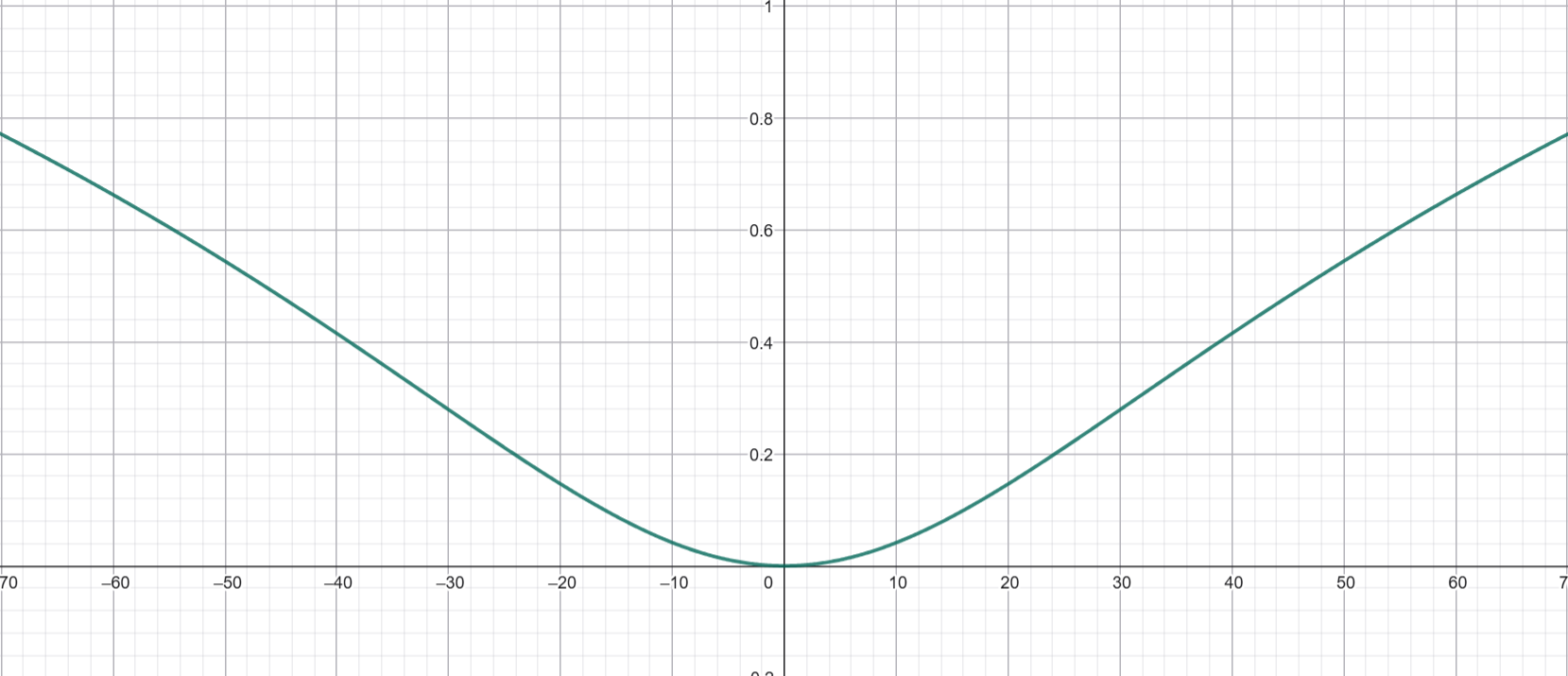
This problem happens because each frame, we are updating the vector difference between the current position of the element and the mouse cursor, and since the element is moving itself, it just gets weird.

To fix this, we can use a mathematical function that, given a value, it will *smoothly remap* it to a smaller one. The perfect candidate is the <span className="katex">
<span className="katex-mathml">
<math xmlns="http://www.w3.org/1998/Math/MathML">
<semantics>
<mrow>
<mi>

l

</mi>

<mi>

o

</mi>

<mi>

g

</mi>

<mo stretchy="false">

(

</mo>

<mi>

x

</mi>

<mo stretchy="false">

)

</mo>
</mrow>

<annotation encoding="application/x-tex">

log(x)

</annotation>
</semantics>
</math>
</span>

<span className="katex-html" ariaHidden="true">
<span className="base">
<span className="strut" style="height:1em;vertical-align:-0.25em;">


</span>

<span className="mord,mathnormal" style="margin-right:0.0197em;">

l

</span>

<span className="mord,mathnormal">

o

</span>

<span className="mord,mathnormal" style="margin-right:0.0359em;">

g

</span>

<span className="mopen">

(

</span>

<span className="mord,mathnormal">

x

</span>

<span className="mclose">

)

</span>
</span>
</span>
</span>

.
We are going to tweak it a little bit in such a way that it satisfies our requirements.

1. We do not want to deal with infinite values so we move it <span className="katex">
<span className="katex-mathml">
<math xmlns="http://www.w3.org/1998/Math/MathML">
<semantics>
<mrow>
<mn>

1

</mn>
</mrow>

<annotation encoding="application/x-tex">

1

</annotation>
</semantics>
</math>
</span>

<span className="katex-html" ariaHidden="true">
<span className="base">
<span className="strut" style="height:0.6444em;">


</span>

<span className="mord">

1

</span>
</span>
</span>
</span>

 on the <span className="katex">
<span className="katex-mathml">
<math xmlns="http://www.w3.org/1998/Math/MathML">
<semantics>
<mrow>
<mi>

x

</mi>
</mrow>

<annotation encoding="application/x-tex">

x

</annotation>
</semantics>
</math>
</span>

<span className="katex-html" ariaHidden="true">
<span className="base">
<span className="strut" style="height:0.4306em;">


</span>

<span className="mord,mathnormal">

x

</span>
</span>
</span>
</span>
2. We want it to be symmetrical with respect to the <span className="katex">
<span className="katex-mathml">
<math xmlns="http://www.w3.org/1998/Math/MathML">
<semantics>
<mrow>
<mi>

y

</mi>
</mrow>

<annotation encoding="application/x-tex">

y

</annotation>
</semantics>
</math>
</span>

<span className="katex-html" ariaHidden="true">
<span className="base">
<span className="strut" style="height:0.625em;vertical-align:-0.1944em;">


</span>

<span className="mord,mathnormal" style="margin-right:0.0359em;">

y

</span>
</span>
</span>
</span>

 axis, so let's use the power of 2
3. The classical <span className="katex">
<span className="katex-mathml">
<math xmlns="http://www.w3.org/1998/Math/MathML">
<semantics>
<mrow>
<mi>

l

</mi>

<mi>

o

</mi>

<mi>

g

</mi>

<mo stretchy="false">

(

</mo>

<mi>

x

</mi>

<mo stretchy="false">

)

</mo>
</mrow>

<annotation encoding="application/x-tex">

log(x)

</annotation>
</semantics>
</math>
</span>

<span className="katex-html" ariaHidden="true">
<span className="base">
<span className="strut" style="height:1em;vertical-align:-0.25em;">


</span>

<span className="mord,mathnormal" style="margin-right:0.0197em;">

l

</span>

<span className="mord,mathnormal">

o

</span>

<span className="mord,mathnormal" style="margin-right:0.0359em;">

g

</span>

<span className="mopen">

(

</span>

<span className="mord,mathnormal">

x

</span>

<span className="mclose">

)

</span>
</span>
</span>
</span>

 is too "harsh" therefore we also multiply the <span className="katex">
<span className="katex-mathml">
<math xmlns="http://www.w3.org/1998/Math/MathML">
<semantics>
<mrow>
<mi>

x

</mi>
</mrow>

<annotation encoding="application/x-tex">

x

</annotation>
</semantics>
</math>
</span>

<span className="katex-html" ariaHidden="true">
<span className="base">
<span className="strut" style="height:0.4306em;">


</span>

<span className="mord,mathnormal">

x

</span>
</span>
</span>
</span>

 by a constant value to reduce how steep it is (remember we are dealing with pixels)
4. Finally we want to be able to adjust the *amplitude*, therefore we multiply by a constant <span className="katex">
<span className="katex-mathml">
<math xmlns="http://www.w3.org/1998/Math/MathML">
<semantics>
<mrow>
<mi>

a

</mi>
</mrow>

<annotation encoding="application/x-tex">

a

</annotation>
</semantics>
</math>
</span>

<span className="katex-html" ariaHidden="true">
<span className="base">
<span className="strut" style="height:0.4306em;">


</span>

<span className="mord,mathnormal">

a

</span>
</span>
</span>
</span>

.

The final result is the following:

<span className="katex-display">
<span className="katex">
<span className="katex-mathml">
<math xmlns="http://www.w3.org/1998/Math/MathML" display="block">
<semantics>
<mrow>
<mi>

f

</mi>

<mo stretchy="false">

(

</mo>

<mi>

x

</mi>

<mo stretchy="false">

)

</mo>

<mo>

=

</mo>

<mi>

a

</mi>

<mo>

⋅

</mo>

<mi>

l

</mi>

<mi>

o

</mi>

<mi>

g

</mi>

<mo fence="false" stretchy="true" minsize="2.4em" maxsize="2.4em">

(

</mo>

<mfrac>
<msup>
<mi>

x

</mi>

<mn>

2

</mn>
</msup>

<mn>

1000

</mn>
</mfrac>

<mo>

+

</mo>

<mn>

1

</mn>

<mo fence="false" stretchy="true" minsize="2.4em" maxsize="2.4em">

)

</mo>
</mrow>

<annotation encoding="application/x-tex">

f(x)=a \cdot log \bigg( \frac{x^2}{1000} + 1 \bigg)

</annotation>
</semantics>
</math>
</span>

<span className="katex-html" ariaHidden="true">
<span className="base">
<span className="strut" style="height:1em;vertical-align:-0.25em;">


</span>

<span className="mord,mathnormal" style="margin-right:0.1076em;">

f

</span>

<span className="mopen">

(

</span>

<span className="mord,mathnormal">

x

</span>

<span className="mclose">

)

</span>

<span className="mspace" style="margin-right:0.2778em;">


</span>

<span className="mrel">

=

</span>

<span className="mspace" style="margin-right:0.2778em;">


</span>
</span>

<span className="base">
<span className="strut" style="height:0.4445em;">


</span>

<span className="mord,mathnormal">

a

</span>

<span className="mspace" style="margin-right:0.2222em;">


</span>

<span className="mbin">

⋅

</span>

<span className="mspace" style="margin-right:0.2222em;">


</span>
</span>

<span className="base">
<span className="strut" style="height:2.4411em;vertical-align:-0.95em;">


</span>

<span className="mord,mathnormal" style="margin-right:0.0197em;">

l

</span>

<span className="mord,mathnormal">

o

</span>

<span className="mord,mathnormal" style="margin-right:0.0359em;">

g

</span>

<span className="mord">
<span className="delimsizing,size3">

(

</span>
</span>

<span className="mord">
<span className="mopen,nulldelimiter">


</span>

<span className="mfrac">
<span className="vlist-t,vlist-t2">
<span className="vlist-r">
<span className="vlist" style="height:1.4911em;">
<span style="top:-2.314em;">
<span className="pstrut" style="height:3em;">


</span>

<span className="mord">

1000

</span>
</span>
</span>

<span style="top:-3.23em;">
<span className="pstrut" style="height:3em;">


</span>

<span className="frac-line" style="border-bottom-width:0.04em;">


</span>
</span>

<span style="top:-3.677em;">
<span className="pstrut" style="height:3em;">


</span>

<span className="mord">
<span className="mord,mathnormal">

x

</span>

<span className="msupsub">
<span className="vlist-t">
<span className="vlist-r">
<span className="vlist" style="height:0.8141em;">
<span style="top:-3.063em;margin-right:0.05em;">
<span className="pstrut" style="height:2.7em;">


</span>

<span className="sizing,reset-size6,size3,mtight">
<span className="mord,mtight">

2

</span>
</span>
</span>
</span>
</span>
</span>
</span>
</span>
</span>
</span>
</span>

<span className="vlist-s">

​

</span>
</span>

<span className="vlist-r">
<span className="vlist" style="height:0.686em;">
<span>


</span>
</span>
</span>
</span>
</span>

<span className="mclose,nulldelimiter">


</span>
</span>

<span className="mspace" style="margin-right:0.2222em;">


</span>

<span className="mbin">

+

</span>

<span className="mspace" style="margin-right:0.2222em;">


</span>
</span>

<span className="base">
<span className="strut" style="height:2.4em;vertical-align:-0.95em;">


</span>

<span className="mord">

1

</span>

<span className="mord">
<span className="delimsizing,size3">

)

</span>
</span>
</span>
</span>
</span>
</span>

![logx](https://tratteo.it/articles/create-an-addicting-sticky-button-in-nuxt/logx.png)

<tip>

To play around with mathematics you can use online graphical calculators such as [Geogebra](https://geogebra.org).

</tip>

Let us translate this function to code and add it to our `handlePointerMove` handler:

```ts [sticky_element.vue]
function asymptoteFun(val: number) {
    return props.amplitude * Math.sign(val) * Math.log(1e-3 * val * val + 1);
}

function handlePointerMove(ev: PointerEvent) {
    if (!dragging.value) return;
    const el = elementRef.value?.$el;
    if (!el) return;
    const rect = (el as HTMLElement).getBoundingClientRect();
    frame.read(() => {
        const targetX = ev.clientX - (rect.left + rect.width / 2);
        const targetY = ev.clientY - (rect.top + rect.height / 2);
        const restX = asymptoteFun(targetX);
        const restY = asymptoteFun(targetY);
        x.set(restX);
        y.set(restY);
    });
}
```

There is one last thing, as you can notice, inside our `asymptoteFun`, we multiplied by the sign of our value. This is because we do want the function to be symmetrical, but of course we want the element to move in the same direction as the mouse.

## The final code

Putting everything togheter, you now have a very cool component that can be used to enhance any other component with a smooth microinteraction.

<callout icon="mdi:github" target="_blank" to="https://github.com/tratteo/nuxt_template">

Be sure to give a star to my **free Nuxt** template for other very cool components and implemented features.

</callout>

<card-group>
<card icon="mdi:github" target="_blank" title="Free Nuxt 4 template" to="https://github.com/tratteo/nuxt_template">

A dashboard with multi-column layout.

</card>

<card icon="logos:youtube-icon" target="_blank" title="YouTube Tutorials" to="https://www.youtube.com/@matteo-beltrame" color="error" variant="solid">

I post cool stuff and tutorials on my YouTube channel!

</card>
</card-group>

Here is the final code, cheers!

<code-collapse>

```vue [sticky_element.vue]
<template>
    <motion.div 
        ref="elementRef" 
        class="w-fit h-fit" 
        :style="{ x, y }" @hover-start="handlePointerEnter" @hover-end="handlePointerLeave">
        <slot></slot>
    </motion.div>
</template>

<script setup lang="ts">
import { frame, motion, type SpringOptions, useSpring } from "motion-v";

const props = withDefaults(defineProps<{ amplitude?: number; spring?: SpringOptions }>(), {
    amplitude: 10,
    spring: () => <SpringOptions>{ damping: 50, stiffness: 2000 },
});

const elementRef = useTemplateRef("elementRef");
const dragging = ref(false);
const y = useSpring(0, props.spring);
const x = useSpring(0, props.spring);

function asymptoteFun(val: number) {
    return props.amplitude * Math.sign(val) * Math.log(1e-3 * val * val + 1);
}

function handlePointerMove(ev: PointerEvent) {
    if (!dragging.value) return;
    const el = elementRef.value?.$el;
    if (!el) return;
    const rect = (el as HTMLElement).getBoundingClientRect();
    frame.read(() => {
        const targetX = ev.clientX - (rect.left + rect.width / 2);
        const targetY = ev.clientY - (rect.top + rect.height / 2);
        const restX = asymptoteFun(targetX);
        const restY = asymptoteFun(targetY);
        x.set(restX);
        y.set(restY);
    });
}

onMounted(() => {
    window.addEventListener("pointermove", handlePointerMove);
});

onUnmounted(() => {
    window.removeEventListener("pointermove", handlePointerMove);
});

function handlePointerEnter() {
    dragging.value = true;
}

function handlePointerLeave() {
    x.set(0);
    y.set(0);
    dragging.value = false;
}
</script>

<style></style>
```

</code-collapse>

## Sitemap

See the full [sitemap](https://tratteo.it/sitemap.md) for all pages.